Waveplate GUI
The polarimeter waveplate is the only motor in the system not controlled by the Kast Motor Controller. It is controlled separately through the Waveplate GUI. The waveplate gui may be started from gouda, karnak, or shanepc using the command waveplate gui.
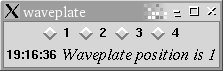
Waveplate GUI
To select a waveplate position, simply click on the button next to the position number you desire. The status message will update when the waveplate has completed moving to the desired position. The status message will also display useful messages about the state of the system.
The waveplate positions correspond to the following rotations:
| Position | Rotation (degrees) |
|---|---|
| 1 | 0 |
| 2 | 22.5 |
| 3 | 45 |
| 4 | 67.5 |
At the current time the waveplate GUI requires the old Kast data taking system to be running for communication with the waveplate hardware. Before starting the waveplate GUI, you should start dx on shanepc (if it isn't already running).
Support Astronomers (sa@ucolick.org) Last modified: Fri Dec 19 15:54:50 PST 2008