Top-end Motor GUI
The top-end Motor GUI (Figure 1), also know as the "MOS UI", is used to control the prime-focusing mechanism, the atmospheric dispersion compensator (ADC) and the quartz flat-field lamps.The software is started on shard with the command
pfcam start mosui
Each of the mechanisms is controlled from one panel. Settings are selected or entered in each panel and movements are initiated by clicking the green arrow button (Figure 2) that appears when a desired position is entered. The status icons in each panel will display the current status of its related motor, e.g. green checkmark for move completed or in progress, pie chart percentage move completed (Figure 3), yellow triangle for a warning (Figure 4), red X for error (Figure 5), etc.
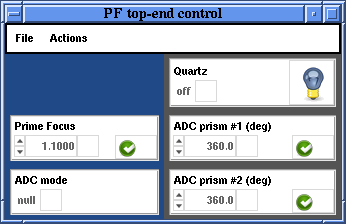
Figure 1: Top-end Motor GUI
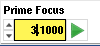 Figure 2: Selected positions that differ from the current motor position are highlighted in yellow and a green move arrow appears. |
 Figure 3: Piechart icon |
 Figure 4: Warning icon
|
 Figure 5: Error icon |
The "Quartz" flat-field lamps are mounted on the top of the prime focus ring. The lamps may be turned on by selecting "On" in its pulldown menu. Alternatively, clicking the light bulb icon toggles the lamp being on or off. When the lamp is on the light bulb icon will change to a lit bulb.
The "Prime Focus" moves the entire optics barrel, which contains the two ADC prisms and the prime corrector plate, up or down for focusing the guide camera. This mechanism also affects the dewar focus, so the Prime Focus should always be set first and then fine focusing done with the Dewar Focus stage in the PFCam Motor Control GUI. The Prime Focus has a range of motion approximately from 1.1 to 4.0. Nominal focus is typically around 3.2.
The ADC has three modes of operation, selected from the "ADC mode" pulldown menu (Figure 7). During normal operations you will want to select "track" so that the ADC prisms move appropriately with position of the telescope to compensate for atmospheric refraction. Alternatively, if you desire not to use the ADCs, select "null" so that the ADC prisms will be parked in the appropriate position to not degrade imaging performance. "eng" mode is purely for testing the operation of the prisms or stopping their motion. When "eng" is selected you can move the prisms independently to any position via the "ADC prism #1" and "ADC prism #2" sections of the GUI.
The "ADC prism #1" and "ADC prism #2" sections work identically. Enter the desired angle of rotation into the entry box and click the green arrow to move it to the desired position. If the ADC mode is set to "track" or "null" the prisms will shortly (within two minutes) move to the appropriate positions on their own. The only way they will stay at the positions you command them if the ADC mode is "eng."
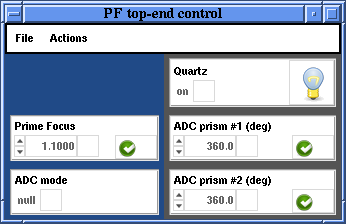 Figure 6: Quartz Lamp ON |
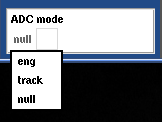 Figure 7: ADC Mode Menu |
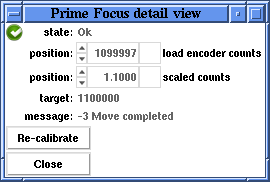 Figure 8: Prime Focus Motor Detail View |
At the top of the motor control GUI is a menu bar with two options File and Actions, shown in Figures 9 and 10.
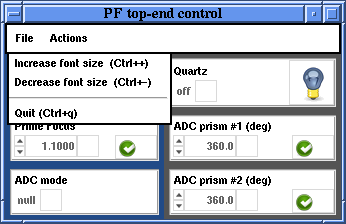 Figure 9: File Menu |
 Figure 10: Setups Menu |
Under the File menu you can increase or decrease the font size or quit the GUI.
The Actions menu has three options. "Clear all" will remove all desired positions from the gui and show the current positions of the motors. "Move all" is a convenient way to move multiple motors at the same time. "Move focus to bottom" moves the Prime Focus motor to the lowest extent of its travel (to remove PFCam from the telescope, the Prime Focus must be at the bottom).
Support Astronomers (sa@ucolick.org) Last modified: Tue Mar 8 21:27:53 PST 2011