Eventsounds
The PFCam Soundserver (eventsounds) is used to generate sounds for different exposure events (e.g. Exposure Begin or Readout End). This piece of software is not required for using PFCam, but is very helpful.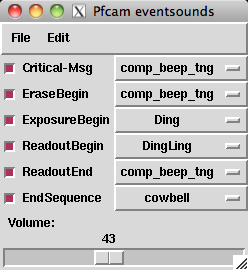 There are four exposure events for which sounds can be generated: Erase Begin,
Exposure Begin, Readout Begin, and Readout End. The checkbox to the left
of each exposure event determines whether the sound is played or not (a red
checkbox means the sound is played).
There are four exposure events for which sounds can be generated: Erase Begin,
Exposure Begin, Readout Begin, and Readout End. The checkbox to the left
of each exposure event determines whether the sound is played or not (a red
checkbox means the sound is played).
Additional sounds are available for when critical error messages occur (Critical-Msg) or when a series of exposures is completed (EndSequence).
A large selection of sounds are available from the pulldown menus. You may test play a sound by right clicking on the sound event name (e.g. EraseBegin). A particular configuration of sounds may be saved for future use by clicking on File - Save... and saving to a file of your choosing (please save the file to your subdirectory in /u/user/observers/). This file can be loaded by clicking File - Load....
Support Astronomers (sa@ucolick.org) Last modified: Tue Mar 8 21:36:49 PST 2011