Focusing the Nickel Spectrograph
There are two programs available for focusing the Nickel Spectrograph: nickelfocus and nickelfocusp. Both programs are written in the IDL language and run from within IDL. IDL can be run from zola or noir.
Nickelfocus uses emission line source spectra taken with a narrow long slit to help the observer determine the best collimator position for the narrowest lines.
Nickelfocusp uses emission line source spectra taken with a pinhole to help the observer determine the best collimator position for the narrowest lines and best spatial dimension focus. At this time, we recommend using nickelfocusp instead of nickelfocus.
If you're going to run IDL from zola or noir,
start by simply typing
Once in IDL simply type
Nickelfocusp takes the optional keywords dir and files and will
prompt you for all the information it needs.
Nickelfocusp
idl
nickelfocusp,[dir=dir,files=files]
Keywords
| dir=dir | Specifies a directory for the data files if they aren't in the default directory for the data or scratch image directories. |
| files=files | Specifies a file that lists the file names of the focus images. |
| Syntax Examples: | nickelfocusp nickelfocusp,dir='/workspace/' nickelfocusp,files='file.list' nickelfocusp,dir='./',files='focusimages.list' |
|
To measure the widths of the emission lines, nickelfocusp needs to know their
positions. This list can be interactively generated or read from a file.
The nickelfocusp program will prompt if you want to create a new linelist file. If you respond yes to this query, you will then be prompted for an arc lamp file name. Enter the file name of the most recent arc lamp spectrum you have taken (e.g. scr.fits). The program automatically identifies reasonably high signal-to-noise emission lines in the spectrum. Nickelfocusp will then display a contour plot of each identified line and query you if you wish to accept or reject each line. It is wise to accept only well separated and unblended lines to get the best focus measurement (also, take care not to select cosmic rays). The selected lines are written to a file on the host computer to, /data/idl_tmp/linelistp.nickeland a plot is displayed showing the selected lines (the color of the the line shows the state of the line in the acceptance process: red is rejected, green accepted, blue is current line being examined, white is as yet undetermined). The linelist file is overwritten each time a new linelist is created. If you wish to save the file for future reference or use, copy it to a new file name.
|
 |
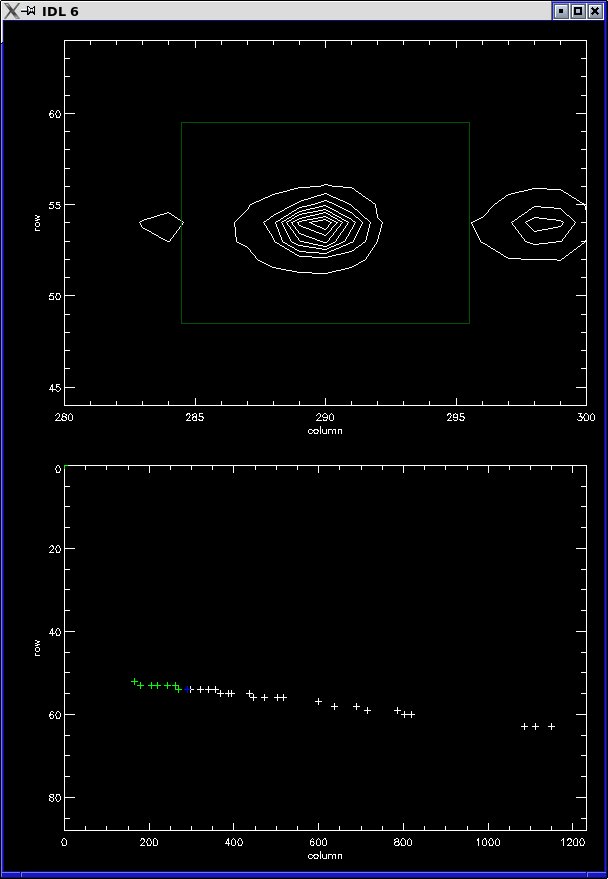
Arc Line Accept/Reject Plot
|
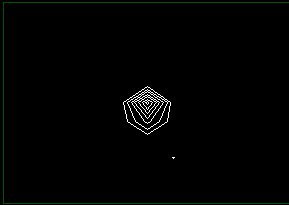 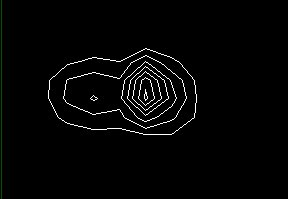
Do not accept Cosmic Rays or Blended Lines for focusing. Left: Cosmic Ray, Right: Blended Line |
||
Using an Existing Line List
An existing line list may be used, in which case the grating and tilt (red side) or grism and x stage (blue side) and CCD readout window must be set so that the lines match the positions (to within a few pixels) in the existing linelist.
To enter the existing linelist file, respond no to the 'Interactively create a new linelist file?' query. You will then be prompted for the linelist file name (please include the path to the file).
Measuring Focus
|
If you have created a new linelist, nickelfocusp will use the first arc
lamp file as the initial focus position. If you are using an existing
linelist file, you will be prompted for a file name for the first
focus image. Nickelfocusp will measure the FWHM of each line in X and Y,
as well as the peak flux, and print the mean X FWHM, Y FWHM, and Peak
flux for the spectral lines.
You will then be prompted for the next focus image name. The same calculations will be performed on this image. This process will repeat until at least three focus positions have been measured. Then plots of X FWHM, Y FWHM, and normalized Peak flux vs. collimator focus position will be displayed and a best fit parabola overlayed. A printout of the predicted best fit collimator position and FWHM (or peak flux) will also be displayed. These parabolic fits will be updated with each additional focus position and file that is entered into nickelfocusp. The program will then instruct you to move the collimator and take a new focus exposure.
|
|
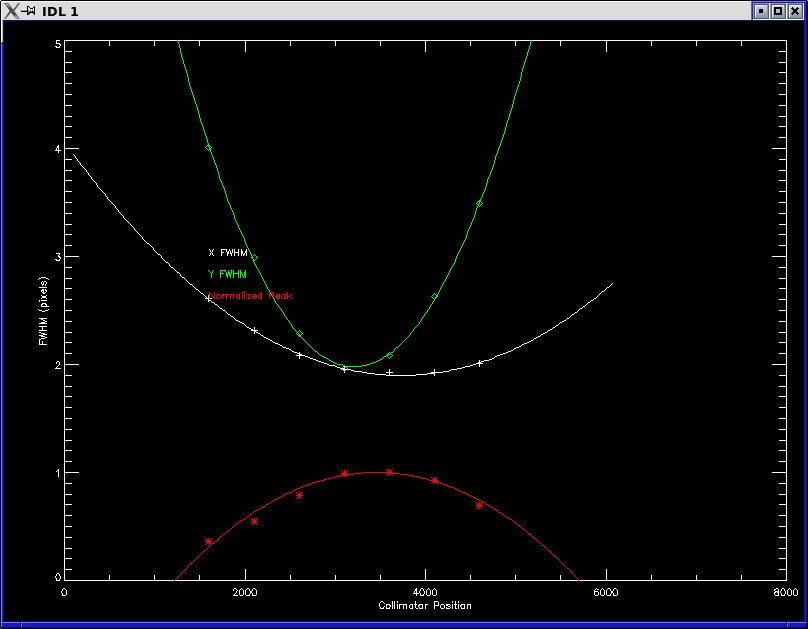
FWHM Plot
|
Exiting nickelfocusp
To exit nickelfocusp, simply respond no to the 'Another focus position and file?' query.
Nickelfocus is written in the IDL language and run from within IDL
on the computer zola. Nickelfocus
operates on any emission line lamp spectrum, measuring selected lines to
determine their full-width at half-maximum. The program provides a
facility for interactively selecting lines to be measured. The program is
fast and easy to use, allowing a large number of lines to be measured,
resulting in accurate focusing.
Starting Nickelfocus |
Keywords |
Creating a Line List |
Using an Existing Line List |
Measuring Focus |
Exiting nickelfocus |
Exiting IDL |
Helpful Hints
If you're going to run IDL from the zola console, or from a
terminal hosted by zola, start by simply typing
Once in IDL simply type
Nickelfocus takes the optional keywords /hardcopy and center_line
and will prompt you for all the information it
needs. The program assumes that you are focusing the Nickel spectrograph.
Nickelfocus
The principle of focusing the Nickel Spectrograph is simple. The spectrum of
an emission line source is recorded at different focus positions using a
narrow slit. Best focus is found where the line widths are at their
minimum. The Nickel-specific focus program called "nickelfocus" is designed
to assist the observer in finding the best focus for the Nickel Spectrograph.
Starting Nickelfocus
idl
nickelfocus,[/hardcopy,center_line=center_line]
Keywords
| /hardcopy | Specifies that you want to print a hardcopy of the final focus fit plot. The plot will be sent to the nickel telescope's printer. The plot will also be saved in the file on zola /data/idl_tmp/nickelfocus.ps until it is overwritten the next time nickelfocus is run. |
| center_line=center_line | Specifies the center row of the 10 row region that is averaged together for identifying lines and measuring line widths. If no center_line is set, the default is to find the center row of the image and average the 10 rows around it. |
| Syntax Examples: | nickelfocus nickelfocus,/hardcopy nickelfocus,center_line=100 nickelfocus,center_line=40,/hardcopy |
The nickelfocus program will prompt if you want to create a new linelist
file. If you respond yes to this query, you will then be prompted for
an arc lamp file name. Enter the file name of the most recent arc lamp
spectrum you have taken (e.g. scr.ccd). The program automatically
identifies reasonably high signal-to-noise emission lines in the
spectrum. Nickelfocus will then display a line profile of each
identified line and query you if you wish to accept or reject each
line. It is wise to accept only well separated, unsaturated, and unblended
lines to get the best focus measurement. The selected lines are written to
a file on zola,
An existing line list may be used, in which case the grating and X
stage must be set so that the lines match the positions (to within a
couple pixels) in the existing linelist.
To enter the existing linelist file, respond no to the 'Interactively create
a new linelist file?' query. You will then be prompted for the linelist file
name (please include the path to the file).
The program will then instruct you to move the collimator and take a
new focus exposure.
To exit nickelfocus, simply respond no to the 'Another focus position
and file?' query.
To end an IDL session, type
A typical move of the collimator for focusing is 500 counts.
If you wish to have the best focus at a specific region of the spectrum,
select only lines (or a single line) near that region of the chip.
Creating a Line List

Arc Line Accept/Reject Plot
/data/idl_tmp/linelist.nickel
and a plot is displayed showing the selected lines (the color diamond
above the line shows the state of the line in the acceptance process:
red is rejected, green accepted, white is current line being examined,
blue is as yet undetermined). The linelist file is overwritten each
time a new linelist is created. If you wish to save the file for
future reference or use, copy it to a new file name.
Using an Existing Line List
Measuring Focus
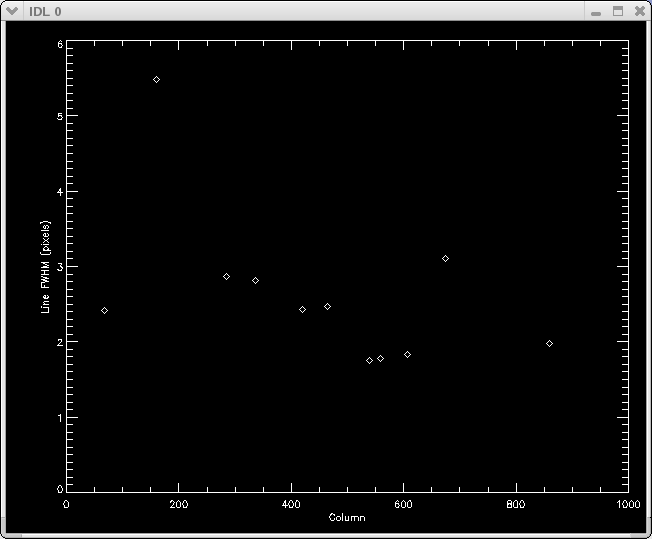
FWHM Plot

Focus Plot
Exiting nickelfocus
Exiting IDL
exit
Helpful hints
Support Astronomers (sa@ucolick.org)
Last modified: Tue Jul 17 18:58:26 PDT 2012