Soundserver
|
 |
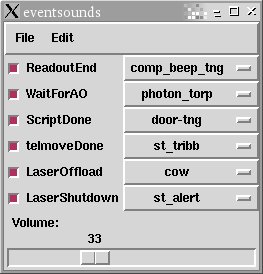
The eventsounds window has a large selection of sounds that can be selected
to notify the user that an event has occured (IRCAL exposure, AO
WFS nod, script, telescope move, or laser offload).
To start the software type eventsounds ircal on gouda, karnak, or shard. If running it on any computer other than gouda, you must be sure that the soundplay program is running on gouda. The slider at the bottom of the window is the volume level. The radio button to the left of each event type turns the sound on or off. A depressed button is red and means the sound is on. The menu buttons on the right choose which sound to use. Right clicking on the event label will test play the sound selected. The sound configuration can be saved to a file for future use by clicking on File-Save... and entering a file name and save location. Please save the file to your gouda subdirectory in /u/user/observers/. A saved sound configuration can be loaded in by clicking on File-Load... and entering the saved configuration file name. To exit the soundserver, simply click on File-Quit.
|
Elinor Gates Last modified: Thu Mar 4 12:41:54 PST 2010