Top-end Interface
NOTE: As of 2010 Aug 30 the GUI for the "MOS UI" has changed. Please contact a support astronomer for details. Software starts with the same command, pfcam start mosui, but the nominal focus is now between 300 and 320 for the Prime Focus stage.This interface, also known as the "MOS UI" was inherited from the Multi-Object Spectrograph (MOS) for which the prime-focus optics now used by PFCam were first designed and built. The optics consist of a prime focus corrector which provides a well-corrected, one-degree diameter field (of which PFCam uses only a portion), and an atmospheric dispersion compensator (ADC).
The MOS interface is used to focus the telescope by moving the prime focus corrector, and to control the ADC. The MOS UI also controls a set of quartz lamps on the prime focus ring used for dome flats.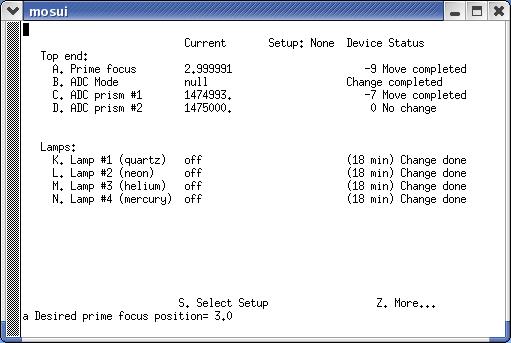 A. Prime Focus
This selection focuses the telescope by pistoning the corrector along the optical axis. The range of focus travel is from about 1.6 to 4.0. Nominal focus is around 3.0 to 3.3. B. ADC Mode
One may enter "track" to automatically compensate dispersion as the telescope tracks, or "null" to drive the ADC to its null position. Observing is done in the "track" state. (A third option, "eng", allows the ADC's to be manually controlled from selections "C" and "D", but users will be unlikely to have reason to use this option. "C" and "D" are, however, useful as a check that the ADC's are operating.) K. Lamp #1 (quartz)
This option accepts the strings "off" or "on" or their equivalent values, 0 or 1.